Designing trust and transparency into AI assistants
I redesigned how TeamHiiv’s AI assistant handles large file uploads, so enterprise users can see what it’s reading, keep working while it does, and trust what it cites.

Snapshot
I got the team to make the call between speed and accuracy, then designed a five-component transparency system so users could see what the agent was doing at every step. It was handed to engineering as development issues when my contract ended.
- Role
- Lead Product Designer, ContractThere was no PM, so I set the design and product direction from day one.
- Company
- TeamHiiv, an early-stage enterprise AI workspace for large Australian organisations
- Team
- Me, the 2 co-founders (our CEO and CTO) and 2 AI engineers
- Timeline
- April to August 2026, with this work running June to August
- Stage
- Early stage
Context and the real problem
There was no brief when I joined, beyond wanting UX to be a strategic lever for the business.
So I started by tearing down the existing product and interviewing customers myself to work out where the opportunity actually was.
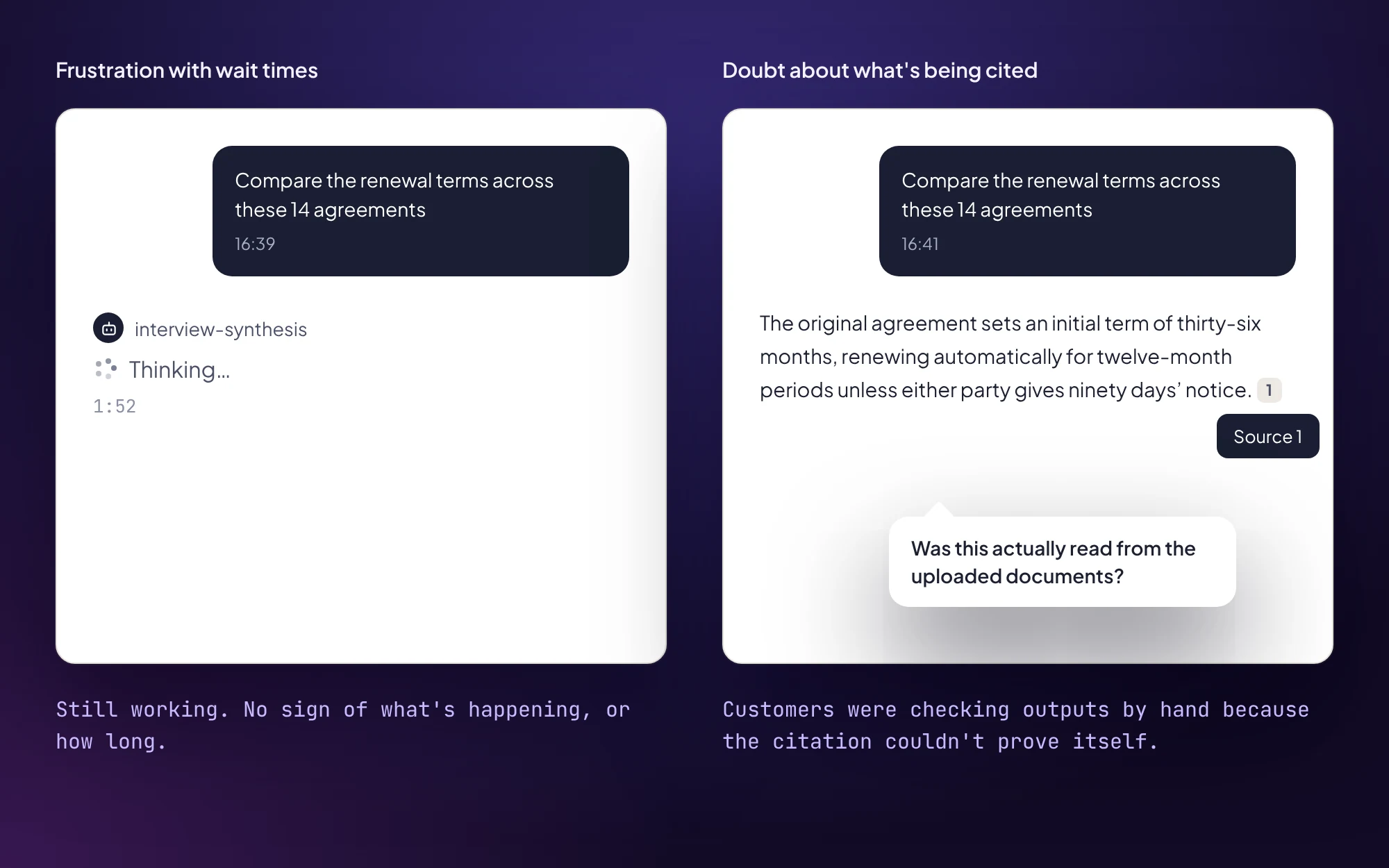
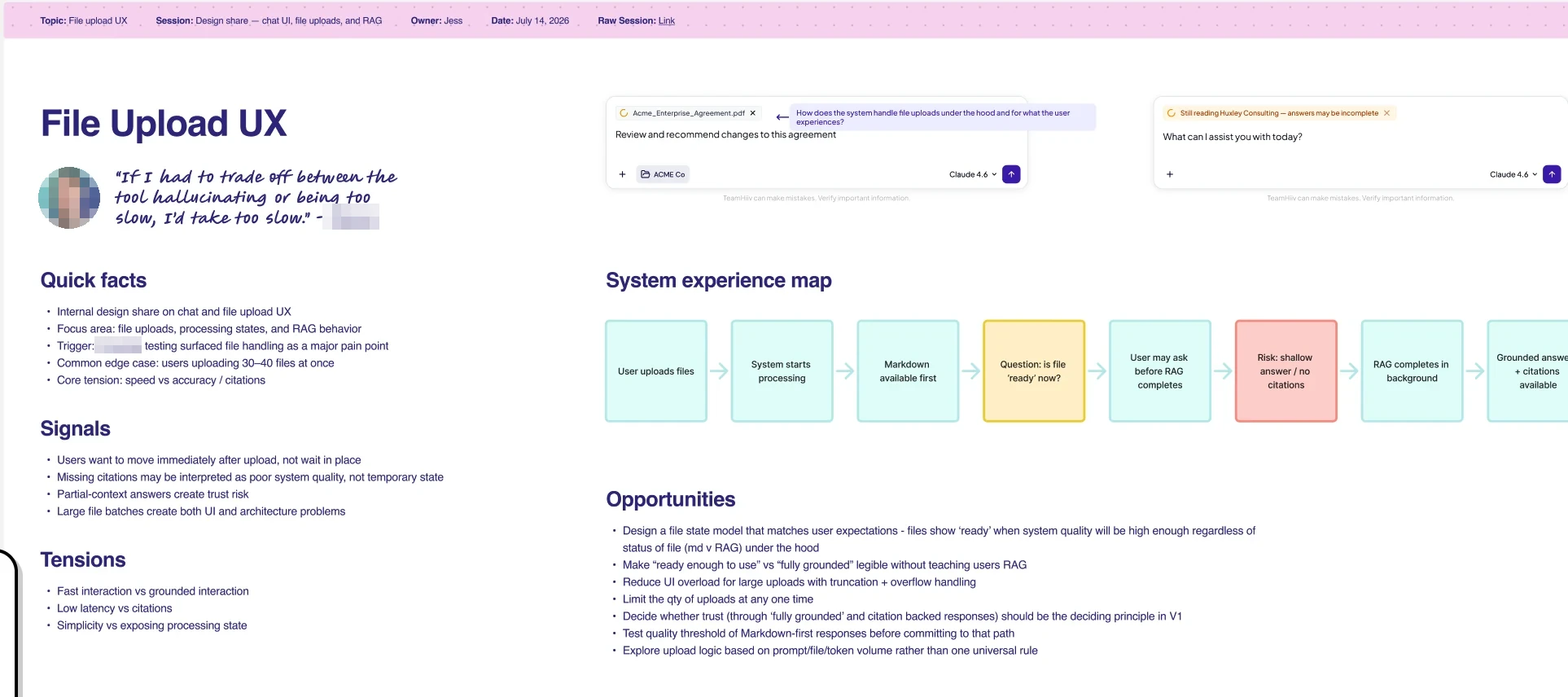
Two themes came through strongly: people were frustrated waiting on the agent, and they didn’t trust that citations were coming from the files they’d uploaded, so they were spending extra time checking outputs by hand. TeamHiiv was selling AI to large organisations on the strength of working from their own documents, so that second theme cut right at the core.
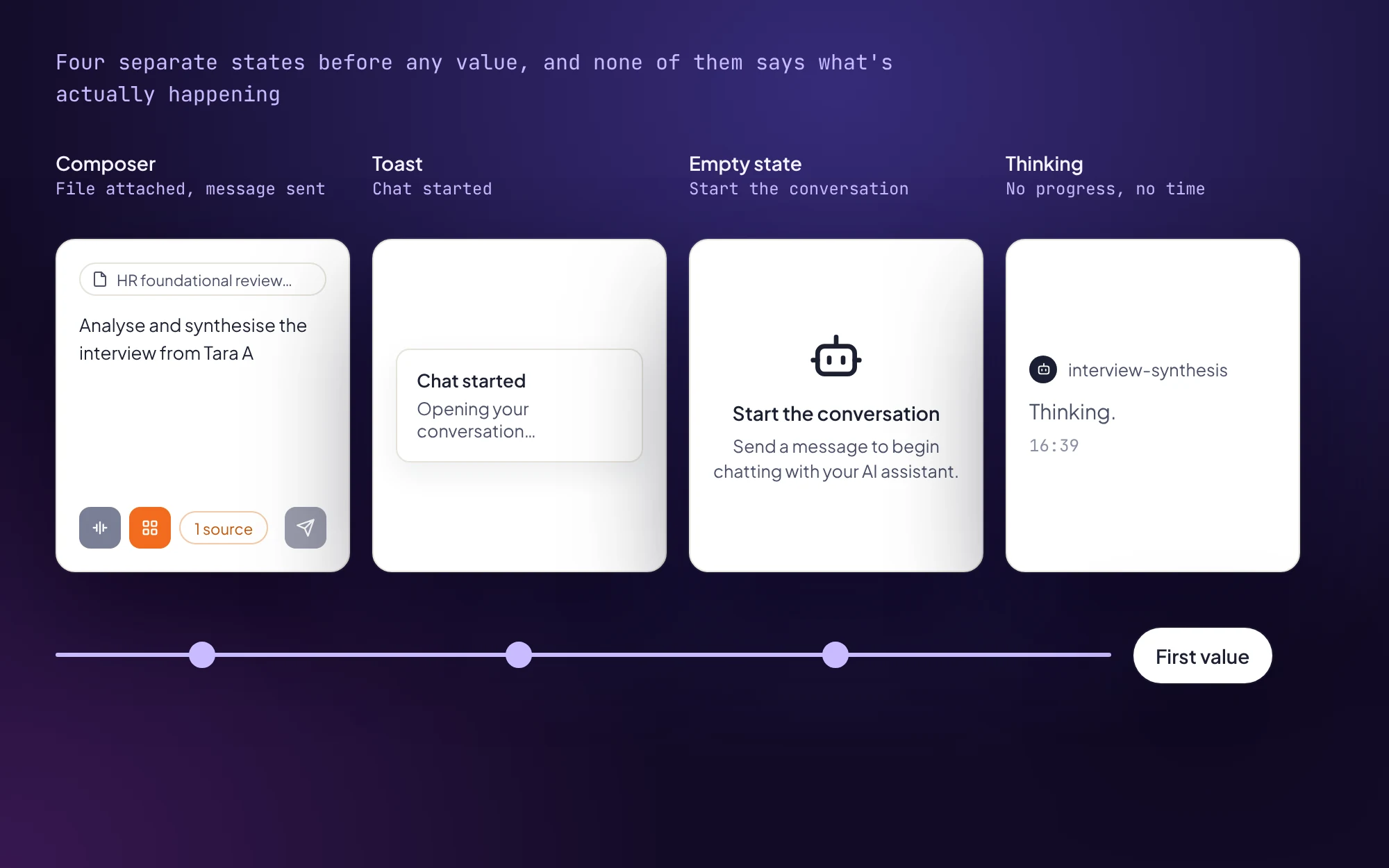
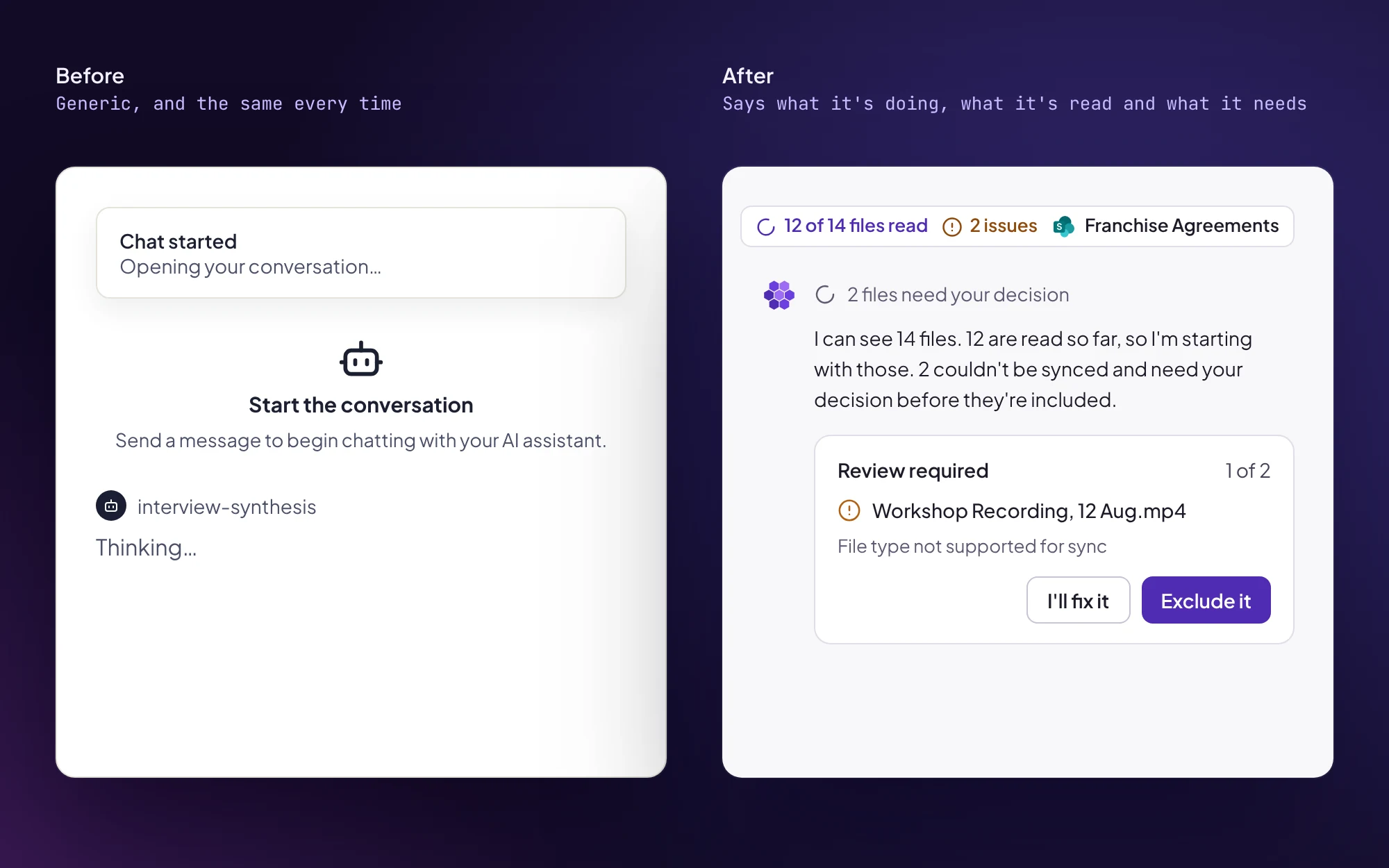
The teardown showed why. A user moved through four separate states before getting any value, and none of them said what was happening. They also couldn’t send a message until upload and sync had fully finished.
Where we started
Where I put the focus
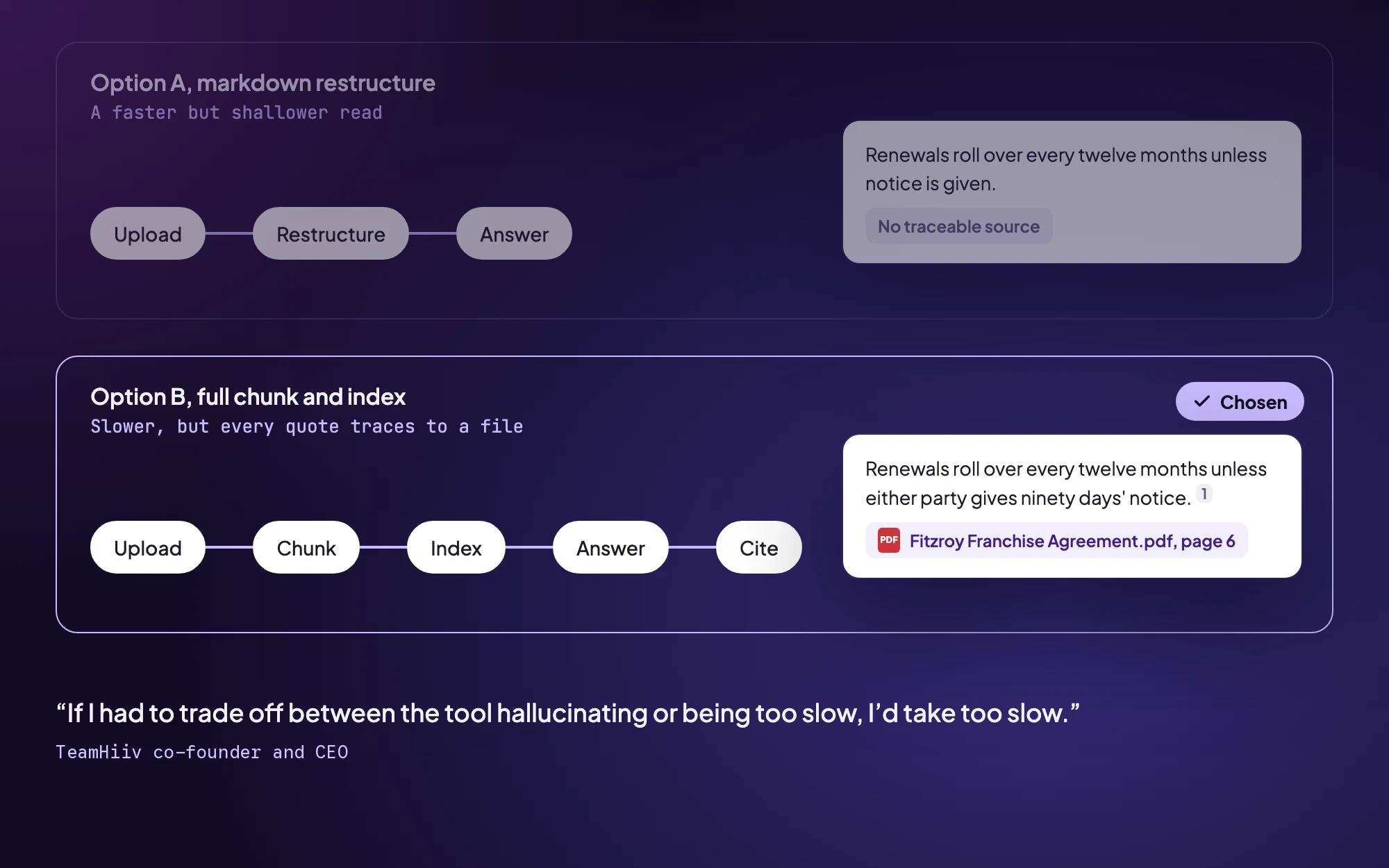
- Decide before designing. A fast markdown read and the full chunk-and-index pipeline needed completely different interfaces, so the team had to make that call first.
- Design for every agentic moment. Upload was the sharpest example, but thinking states, clarifying questions, citations and connector permissions had the same gap. I scoped the work as a transparency system, with file upload as the first flow it had to carry.
Key decisions
Decision 1
Accuracy over speed
- What I did
- I ran a design crit with the co-founders and engineers to make the call before I designed anything. Our CTO was initially keen on the markdown route, and it was a clever option. My role was drawing out what the co-founders were hearing from customers every day and putting it next to what I’d heard in interviews: people were already double-checking outputs.
- Why
- I went in leaning towards accuracy. The connection to sources and citations was the whole point of the product for these customers, and I believed there were performance options we hadn’t explored yet, both in engineering and in how I designed the wait itself.
- What I chose
- The full pipeline, plus every performance improvement engineering could find. Our CEO put it simply: “If I had to trade off between the tool hallucinating or being too slow, I’d take too slow.”
- Trade-off
- Some waits would genuinely be minutes, so my design problem became making a long wait legible. I deliberately didn’t set a wait-time threshold, because what someone will tolerate depends on what they’re getting back, and one number couldn’t hold that range. Instead I designed so the user is never blocked and always knows the state.
Decision 2
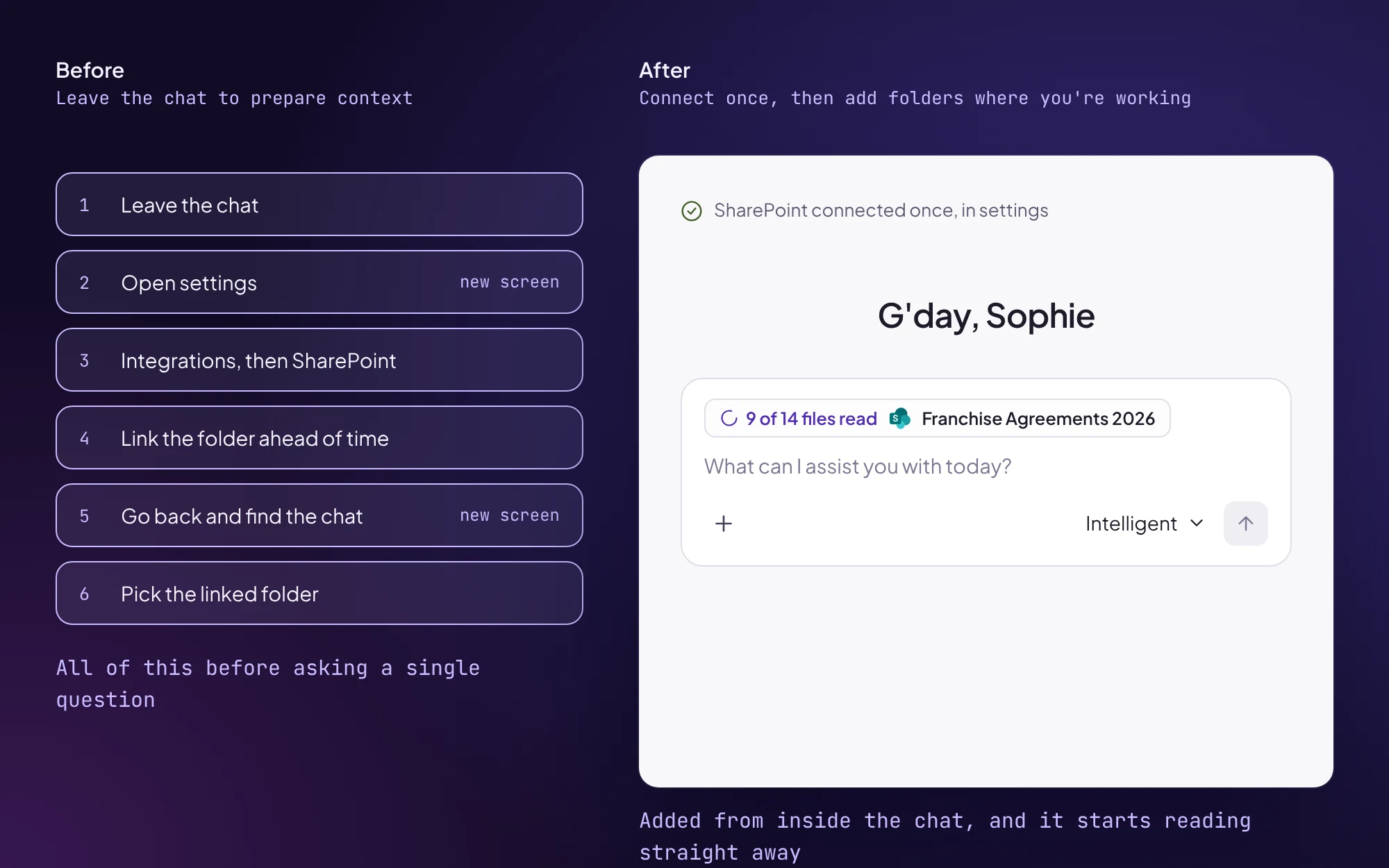
Connect once, sync at the moment of need
- What I chose
- The second.
- Why
- People shouldn’t have to leave their work to prepare context they might need later, and syncing where they’re working puts the status right where they’re looking.
- Trade-off
- Syncing at the moment of need puts the wait in the middle of the task, which is exactly why the next two decisions mattered.
Decision 3
Let people keep working while files index
- What I chose
- The third. The agent says something like “I can see 40 files, 12 are indexed so far” before it answers.
- Why
- Blocking left people stuck. Answering quietly from a partial set would let citations imply coverage the agent didn’t have, which was exactly the trust problem customers had raised.
- Trade-off
- Early answers can be incomplete, and the user has to judge them. When I left, this was still an untested bet that stating coverage helps people judge a partial answer instead of distrusting it.

Decision 4
Surface failures where they happen, and give people a way through
- What I chose
- The agent stops in the thread and asks, giving the reason plainly (no access, unsupported file type, password protected). Each failed file gets its own card with two choices, fix it or exclude it.
- Why
- Before, a failed file in a large folder just disappeared and the user never knew, and a single failed file stopped the whole upload before the message was even sent. I pushed for per-file resync too. Once we were showing people which files failed, we owed them a way to finish the job, and resyncing a whole folder to fix one file would have made that painful.
- Trade-off
- The agent interrupts the task to ask, adding a step mid-flow so that nothing gets quietly left out.

Influence
With no PM and no existing design practice, I introduced the rituals the team ran on.
- Continuous discovery, with customer interviews feeding an opportunity solution tree
- A weekly design crit, which I always opened by reframing around our core users and the opportunity we had in focus
- Regular Loom walkthroughs, so everyone could follow the design thinking between sessions
 Redrawn
Bringing the team along
Widening file upload into a transparency system was a scope change. Because every crit started from the same customer-backed opportunities, each new component arrived as a way to solve something the team had already agreed mattered, so the case made itself.
What outlasted me
On my last day I handed over a package built so the team could keep going without a designer in the room:
- A tokenised design system covering colour, type, spacing, radius and elevation, published to a dev-facing tokens repo
- 81 components, 14 patterns and 9 templates documented, with every deviation tagged as an intentional exception, legacy debt or an experiment, so the team could tell a decision from debt
- An honest open-items list ranked by severity, so the debt they inherited wasn’t a surprise
- 9 Claude skills I wrote (a three-skill audit and documentation plugin, plus six Figma skills for tokens, migration, repo sync, layer naming and Linear handoff), so the team could run my process instead of just inheriting its output
Solution
Five components, designed to work in any agentic moment, with file upload as the first flow they had to carry.
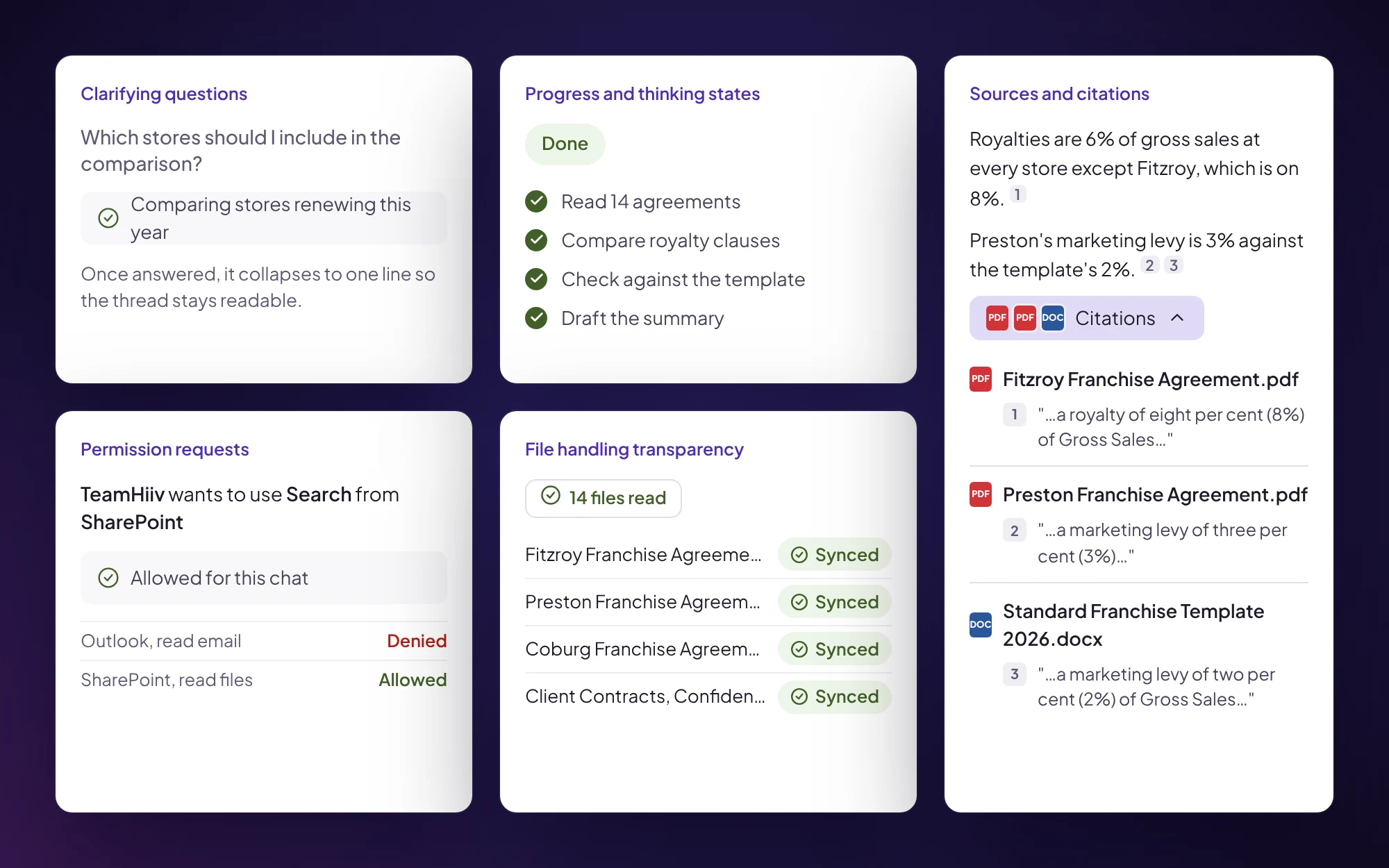
- Progress and thinking states. Distinct states for thinking, working and generating, plus a checked-off progress list. A wait of minutes needs to show movement, and it needs to be something you can check back on rather than a spinner you sit in front of.
- File handling transparency. “Reading 14 files”, narrowing as it works through them, with the same status in the chat thread and the project, so the user never sees two versions of the truth.
- Clarifying questions. Single or multi-select, collapsing to a summary once answered, so settled decisions don’t clutter the thread.
- Sources and citations. Every quote links back to the file and page it came from, with the excerpt, so a user can check a claim in one click instead of hunting for it.
- Permission requests. An explicit allow or deny before the agent uses a connector, with a visible history of what’s been allowed.
Old vs new
 Original Figma
 Original Figma
Outcomes
My contract ended before any of this shipped, so there are no usage numbers. Here’s what I can stand behind.
- 5 of 5Components written up as development issues by handover, with the core upload flow
- 81Components documented in the design system I handed over
- 9Claude skills handed over, so the team could run my process without me
What I’d have measured
- Time from upload to first message sent
- How often people send a message while files are still indexing
- Failed files fixed vs excluded, and how many go unresolved
- Whether customers report spending less time checking citations by hand
Reflection
Push for explicit decisions earlier
When I started it was just me and the two co-founders, and the engineers joined later. Early in the engagement there was plenty to keep me going, so I chose to work with whatever direction came my way rather than push for firm calls. Looking back, we were less aligned than we thought, and I navigated around that instead of naming it.
Next time I’d push sooner for explicit decisions we could record and come back to, especially the technical ones, even when it feels early in an engagement to be that firm. The speed vs accuracy crit worked because it forced the call, and I’d run more of those from the start.
Agree on measures before handover
I’d set up the measures above with the team before I left, so the outcomes could be tracked without me.
For exploration…
The system assumes someone is watching, or will check back. For a large folder that takes minutes, the right way to bring a user back once indexing finishes is still an open question, and I’d love to take it further as these patterns settle across AI products.
Product screens are rebuilt in code from my TeamHiiv designs, which use a mock client and mock data throughout. The opportunity solution tree is redrawn and simplified. The discovery one-pager and original Figma frames are shown as they were, with people’s names and photos redacted.